
|
An AI-Built Pentatonic Scale Trainer: Learning the Guitar Fretboard Visually
This is a fully functional web application with multiple learning modes, including block practice, connection exercises, phrase practice, key practice, and collapsible theory notes. Rather than showing the entire application, this article highlights a selection of representative screens and features.
When learning the pentatonic scale on guitar, one of the first difficulties is not necessarily the music theory itself. It is simply understanding where to play the notes on the fretboard.
Even after memorizing a pattern from a video or diagram, it can easily be forgotten after a break from practice. Learning a single shape is also not enough if it remains unclear where that shape sits on the full fretboard, how it connects to neighboring shapes, or how it can be applied to other keys.
To address this problem, I used ChatGPT and Codex to build a personal web application for learning the pentatonic scale visually.
The aim is not to understand every theoretical concept before touching the guitar. Instead, the application provides a clear fretboard diagram and a sequence of notes to follow, allowing the overall structure to emerge gradually through practice.
The project has two main goals:
- To understand the pentatonic scale as a visual map across the fretboard
- To apply the learned shapes to movement between blocks, short phrases, and other keys
Viewing the E Minor Pentatonic as a Fretboard Map
The application begins with the E minor pentatonic scale.
Its five notes are E, G, A, B, and D. All six open strings in standard tuning belong to this set of notes, making E minor particularly suitable for learning the fretboard from the open-string end.
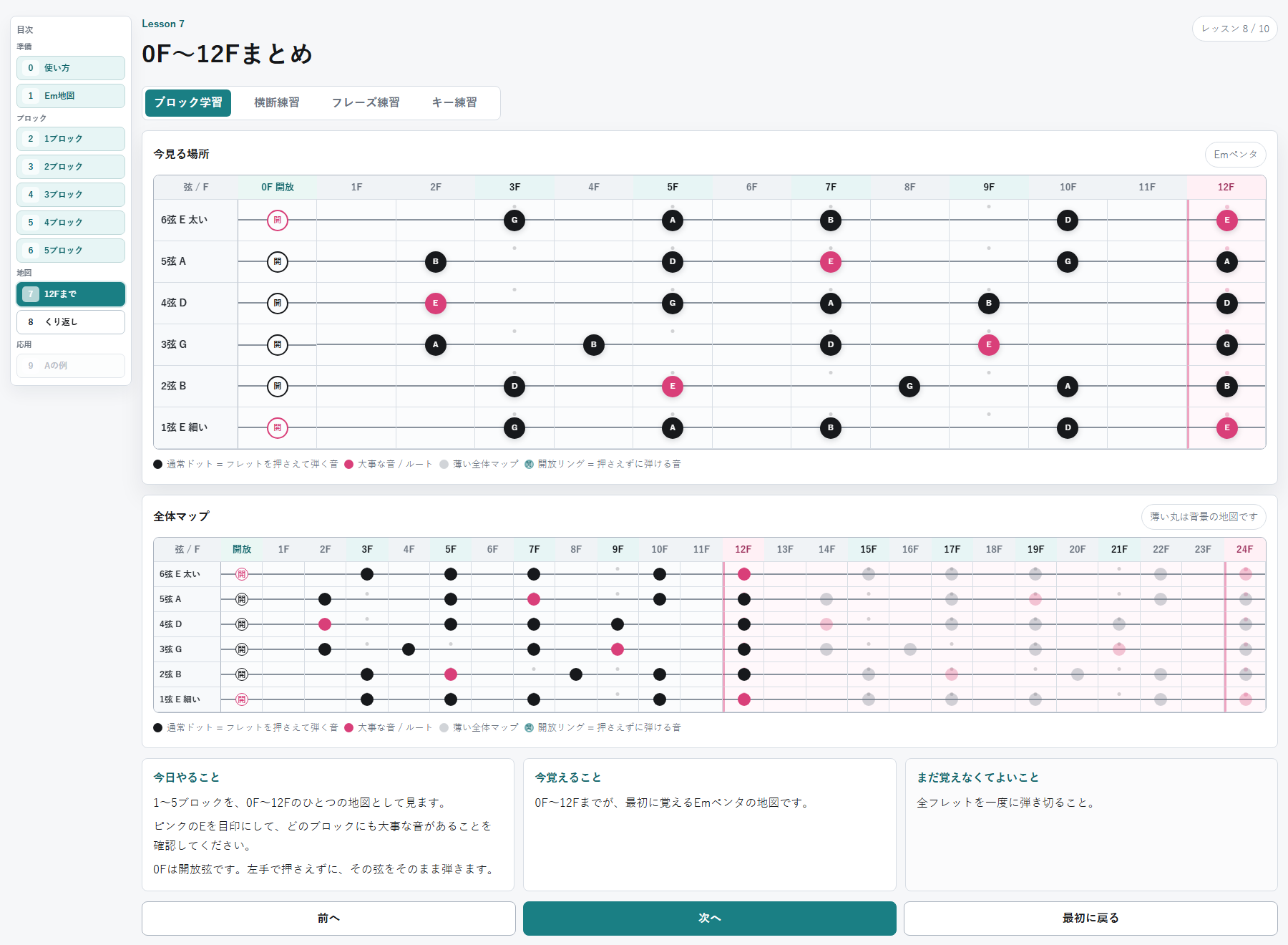
The application divides the area from the open strings to the 12th fret into five blocks. Each block can be studied separately before the complete map is shown.
In the interface, “0F” means an open string rather than a fret that must be pressed. The string is played without using the fretting hand.
Black dots represent regular scale tones, while pink dots represent E, the root note. Open strings use a separate ring symbol so that they are not mistaken for fretted notes.
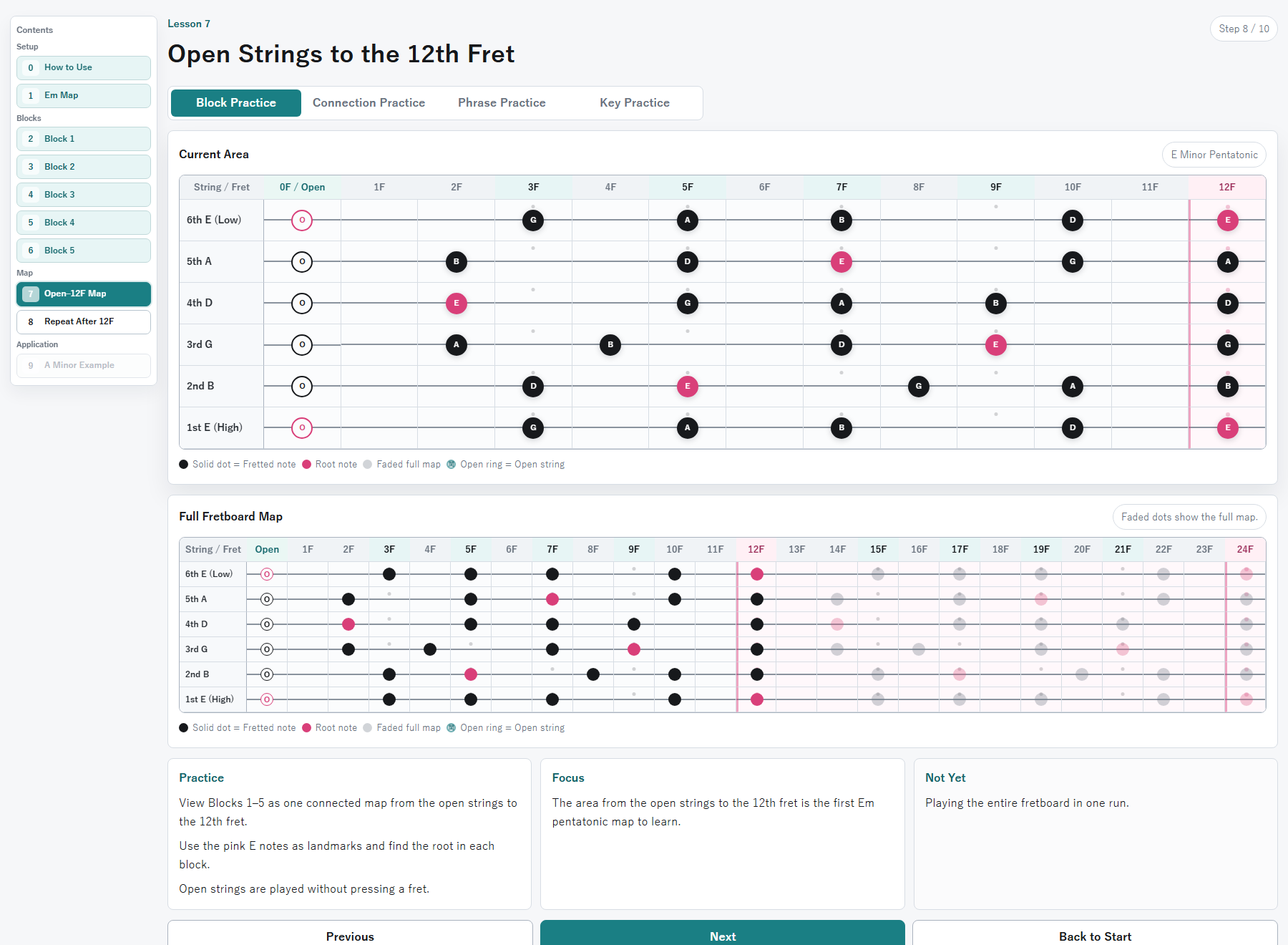
This view combines all five blocks and displays the E minor pentatonic scale as a single map from the open strings to the 12th fret.
The goal is not to memorize every note immediately. The first step is simply to see how the pentatonic notes are distributed across the fretboard.
The Pattern Repeats After the 12th Fret
At the 12th fret, the same note names as the open strings appear one octave higher. The 13th fret corresponds to the 1st fret, the 14th to the 2nd, and the same sequence continues beyond the 12th fret.
For this reason, the application treats the area from the open strings to the 12th fret as the first map to learn. The area beyond the 12th fret is shown more lightly, making it clear that the same pattern repeats one octave higher.
Rather than trying to memorize the entire neck at once, the initial learning range is limited to the first 12 frets.
Moving Horizontally from the Open String to the 12th Fret
The pentatonic scale is not limited to a single block.
When each block is learned in isolation, it is easy to remain within one small area of the neck. Moving naturally into another register requires an understanding of how the blocks connect.
The application therefore includes exercises that connect neighboring blocks, as well as a traversal exercise that moves horizontally from the open string to the 12th fret.
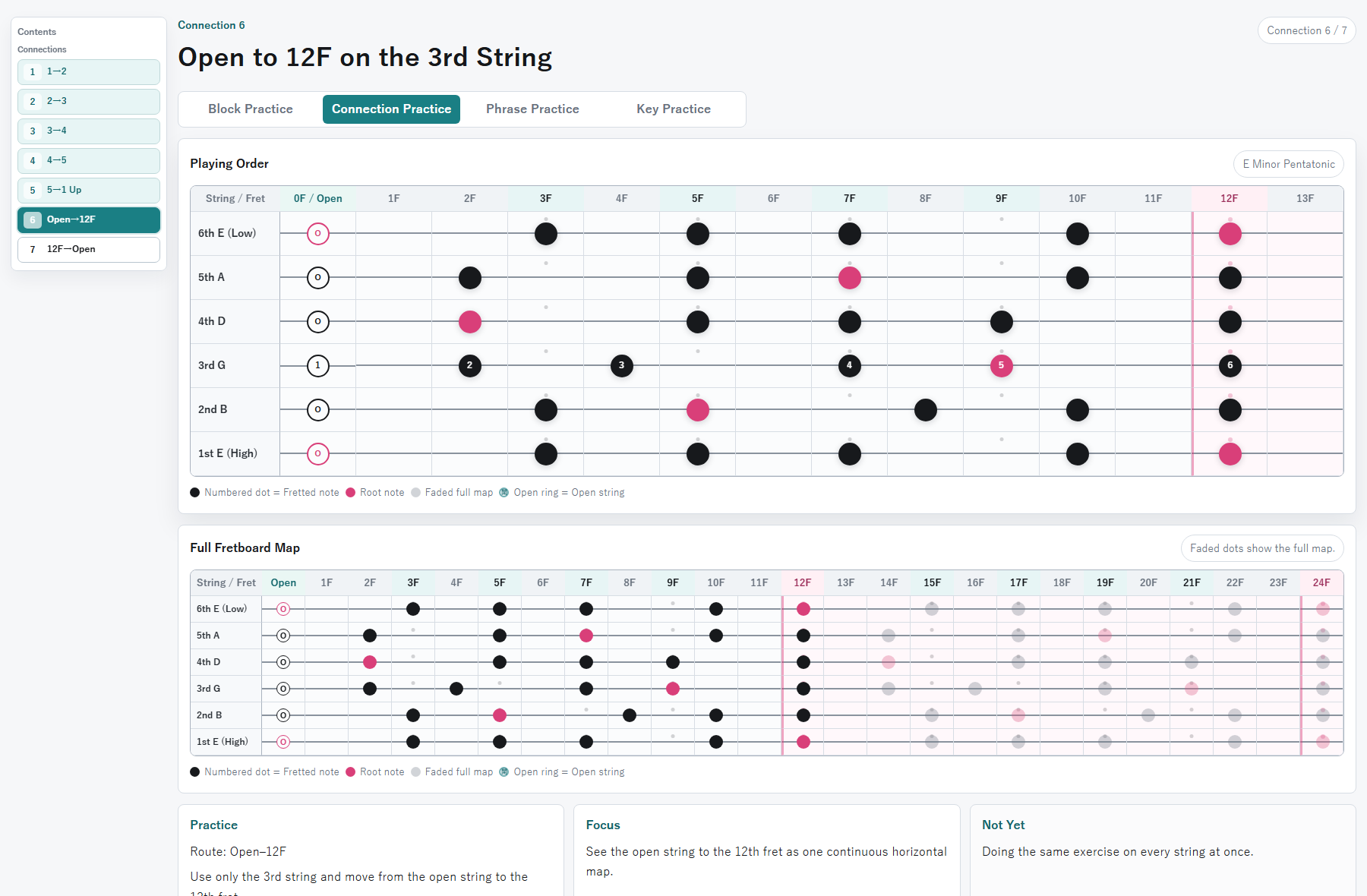
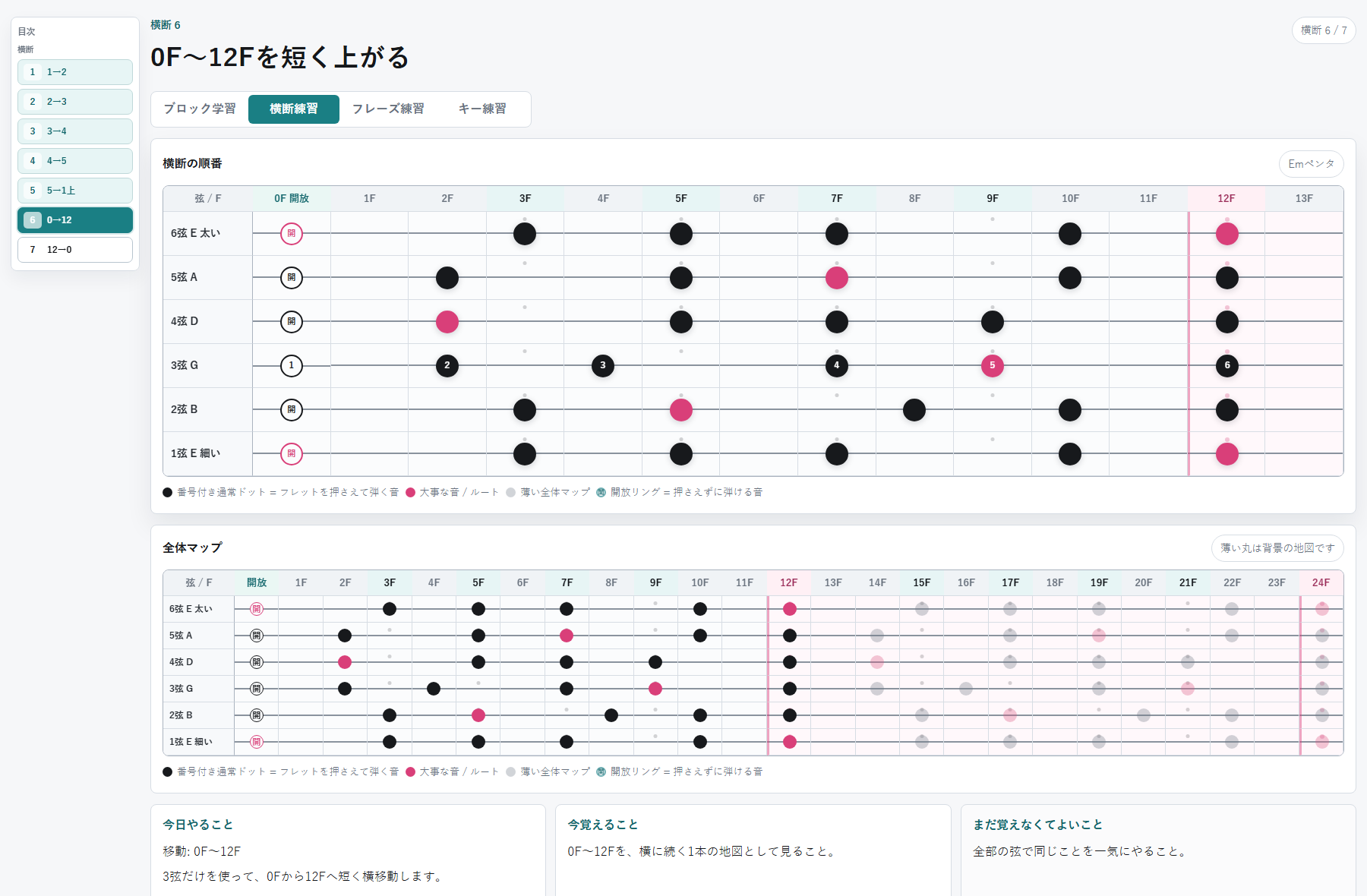
In this exercise, notes from the E minor pentatonic scale are played along the third string, moving from the open string to the 12th fret in numbered order.
The numbered dots make the route across the fretboard easy to follow. Instead of moving only up and down within one block, the exercise crosses several blocks and demonstrates that the notes form one continuous fretboard map.
A simplified TAB display is available as a reference, but the numbered fretboard diagram remains the main learning tool. The purpose is to understand both the note positions and the direction of movement rather than relying only on TAB numbers.
Building a Collection of Short Phrases
Memorizing the pentatonic note positions does not automatically produce natural improvisation.
Playing the scale straight up and down may avoid strongly dissonant notes, but it often sounds more like an exercise than a musical phrase.
Actual phrases use variations such as skipping notes, repeating a note, returning to an earlier note, or leaving space between groups of notes.
The application therefore includes short phrase exercises as an intermediate step before free improvisation.
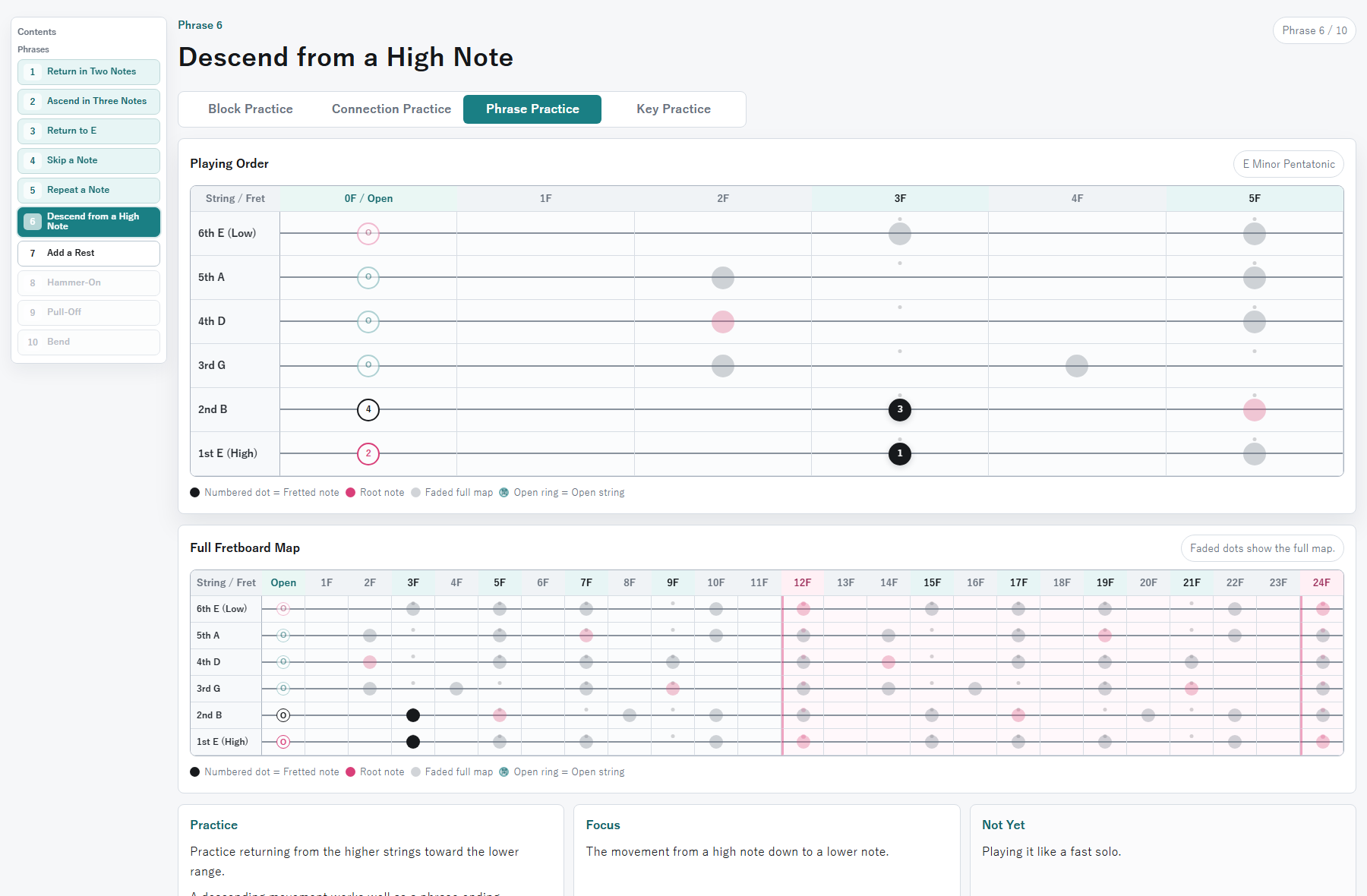
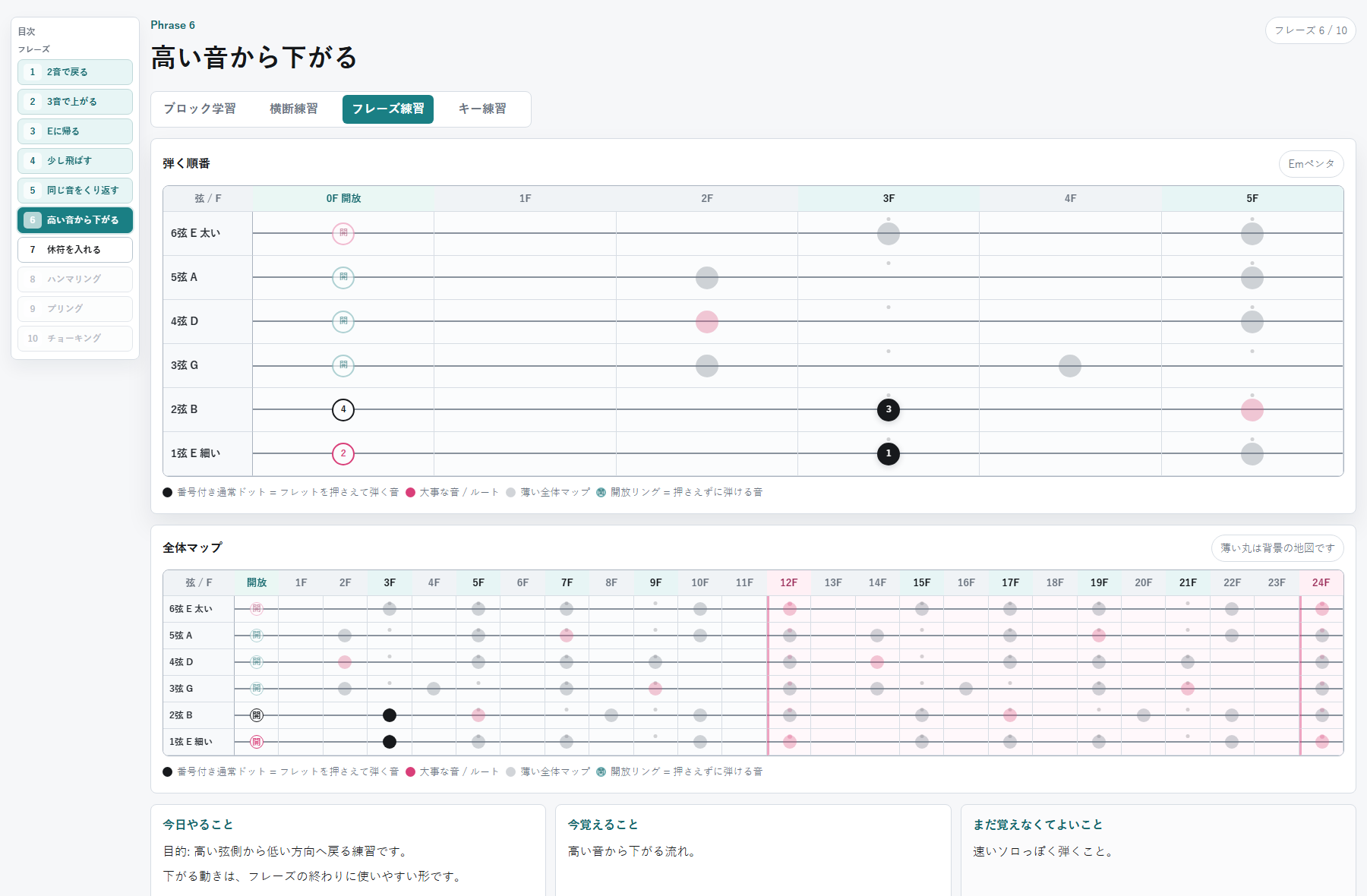
Each phrase uses numbered dots to show not only which notes to play, but also the exact order in which they should be played.
The collection includes short, reusable patterns such as returning with two notes, ascending with three notes, descending from a higher note, repeating the same note, and using techniques such as hammer-ons, pull-offs, and bends.
Rather than attempting completely free improvisation from the beginning, the aim is to learn small musical expressions and gradually build a personal vocabulary of phrases.
Just as example sentences are useful when learning a language, short guitar phrases can make it easier to apply individual notes and shapes in a more musical way.
Moving the Em Shape to Other Keys
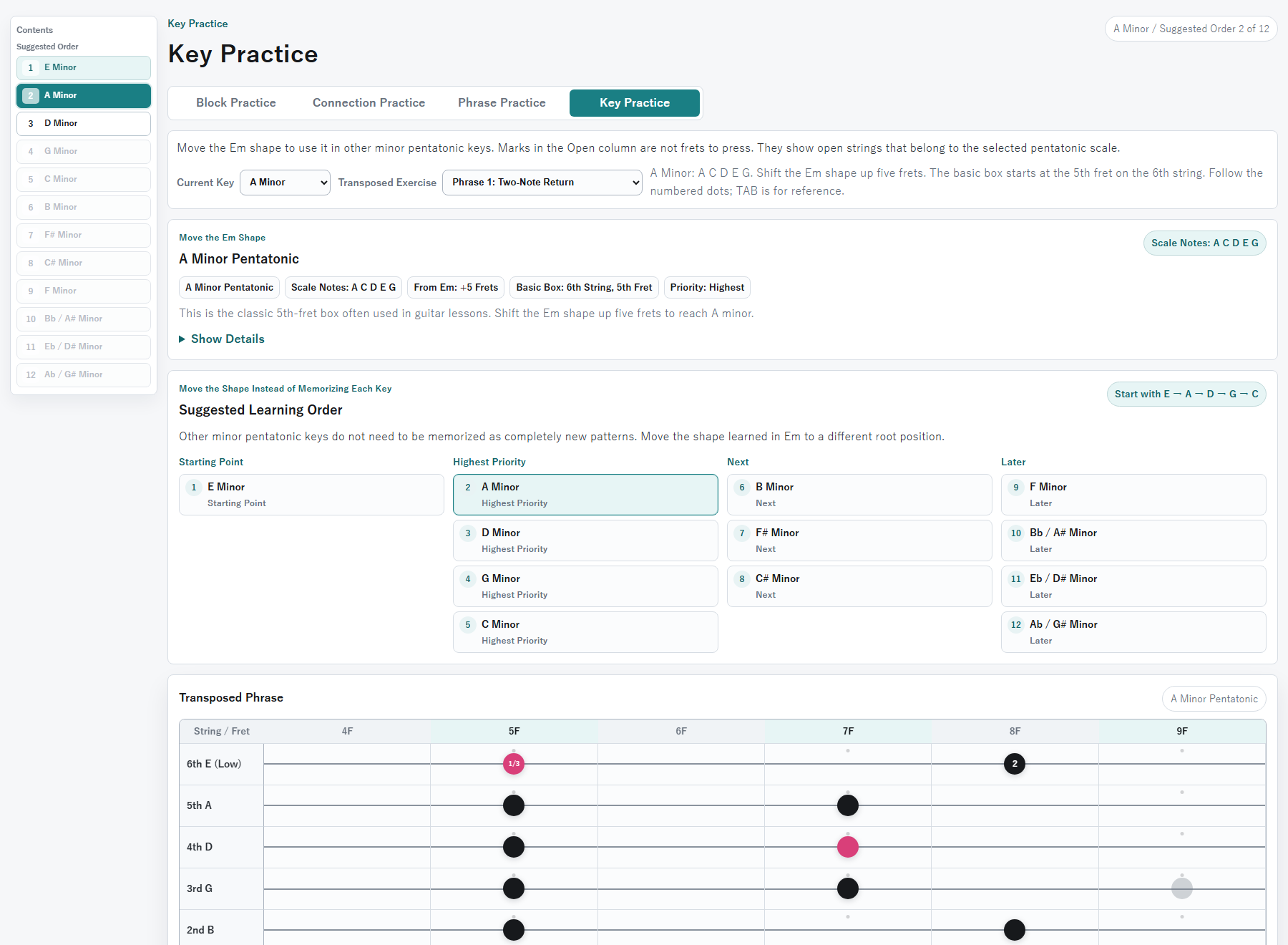
After learning the E minor pentatonic shape, the same structure can be moved to a different position to play the minor pentatonic scale in another key.
For example, moving the basic Em shape five frets higher produces the A minor pentatonic shape.
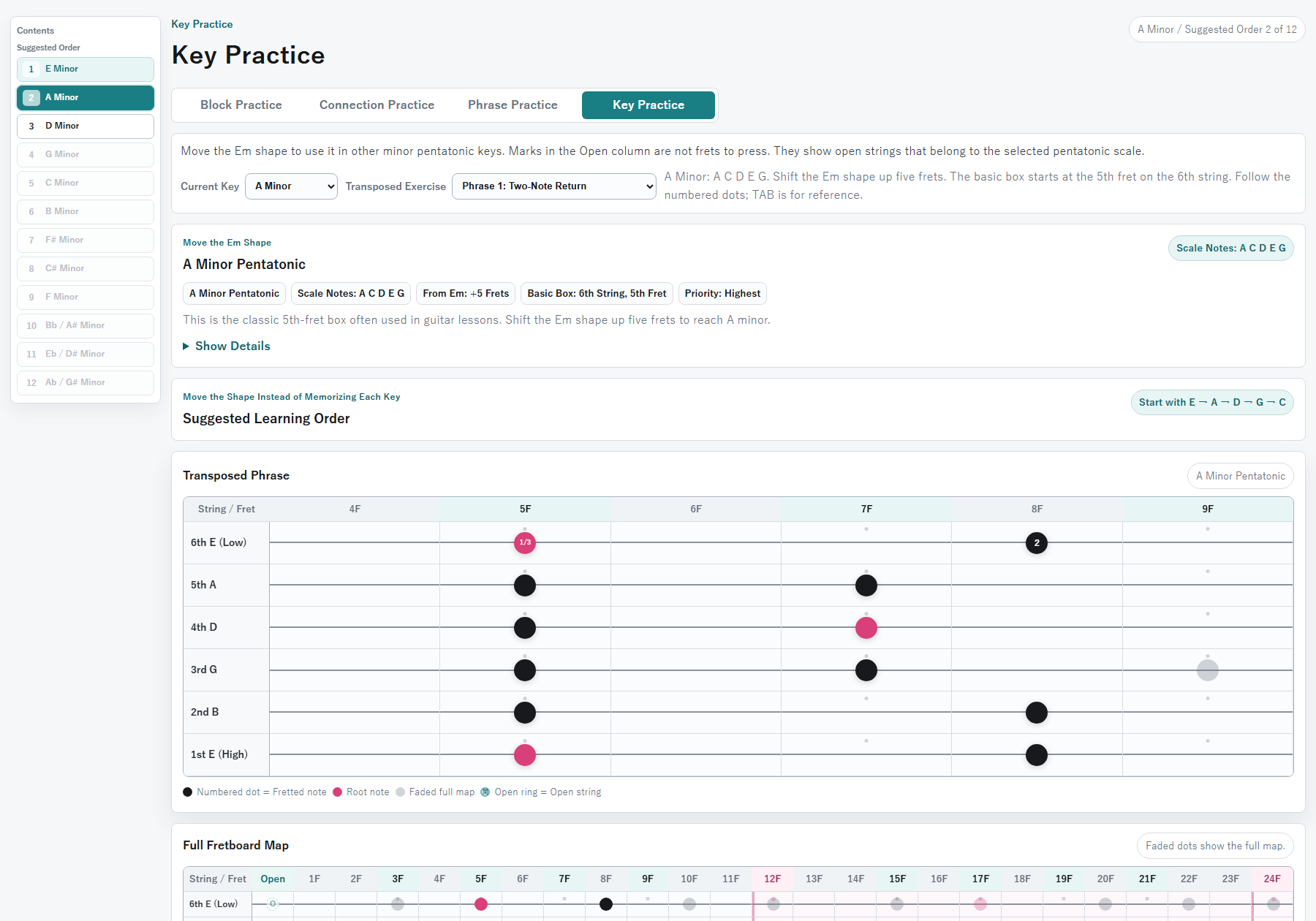
The key-practice section covers the minor pentatonic scale in all 12 keys and explains what remains the same and what changes in comparison with Em.
The shape and playing order remain the same, but the root note and the five scale tones change. In A minor pentatonic, the notes are A, C, D, E, and G.
The important point is that the 12 keys do not need to be memorized as 12 completely separate shapes. Each one can be understood as the Em shape moved to a different root position.
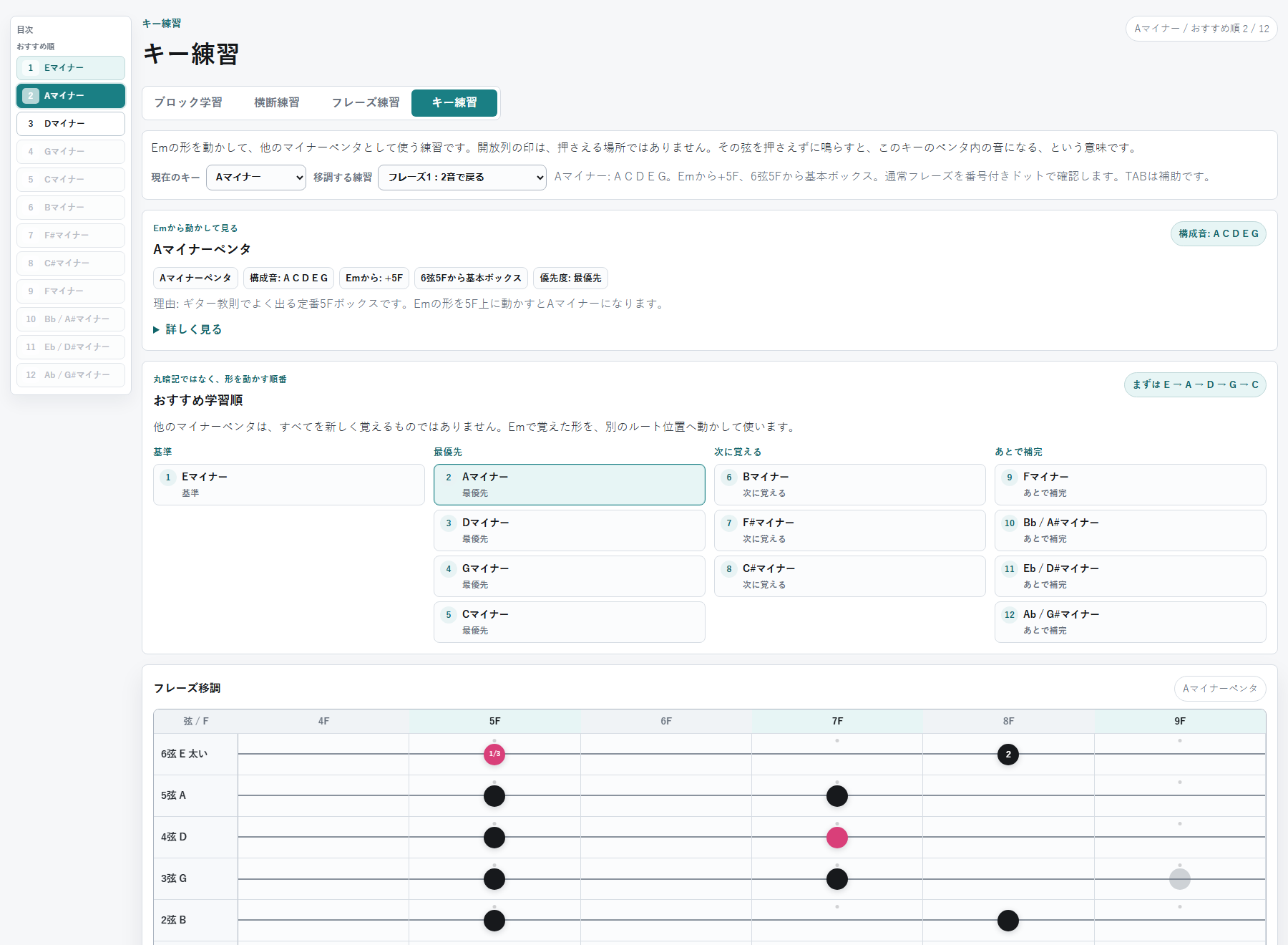
The application also presents a suggested learning order, beginning with E, A, D, G, and C. This guidance can be expanded when needed and collapsed during normal practice.
Reading Music Theory Only When Needed
I am interested in understanding the theory behind the scale, but long explanations can become distracting when they remain visible beside the fretboard.
For this reason, the more detailed theory is placed inside collapsible sections.
Depending on the exercise, the application explains topics such as:
- The notes of the E minor pentatonic scale
- The role of the root note
- The interval formula 1, ♭3, 4, 5, and ♭7
- The relationship between open strings and the 12th fret
- Why the blocks connect across the fretboard
- How moving the same shape changes the key
Even when the theory is not clear at first, reading it after playing the relevant shapes makes it easier to connect the explanation with the actual notes on the guitar.
Building a Personal Learning Tool with AI
ChatGPT was used to organize the learning sequence, define the required functions, refine the explanations, and examine the relevant music theory. Codex was used to implement the web application.
The original idea was much simpler: an application that displayed a single pentatonic shape. However, when I reconsidered why I had previously abandoned self-study, I realized that memorizing the shape itself was not the main problem. I did not understand what to do after memorizing it or how it related to the rest of the fretboard.
The application was therefore reorganized into a sequence that covers block practice from the open strings to the 12th fret, connection exercises between blocks, short phrase practice, and transposition to other keys.
The note positions are calculated from standard tuning, the selected root note, and the minor pentatonic formula. Rather than manually fixing every position for Em, the internal structure allows the root to be changed and the same system to be used for other minor pentatonic keys.
AI-assisted development made it possible to redesign the learning process around the exact points that had previously been difficult for me, instead of adapting my practice entirely to the structure of an existing course.
Possible Future Developments
The current version covers the minor pentatonic fretboard map, movement between blocks, short phrases, and transposition to other keys.
Possible future additions include:
- The relationship with the major pentatonic scale
- The blues scale
- Adding phrases discovered during practice
- Phrase categories and favorites
- The relationship between chords and scales
- Analyzing phrases used in actual songs
However, adding too many functions could make it difficult to know what to practice.
The current priority is therefore to maintain a clear sequence: view the shape, follow the numbered notes, connect the blocks, learn short phrases, and move the same shape to another key.
Summary
This pentatonic scale trainer is a personal web tool for gradually learning note positions and playing order from a visual fretboard diagram. It is not intended to make the user memorize all of the theory before beginning to play.
Beginning with the E minor pentatonic scale, the application shows the map from the open strings to the 12th fret, the connections between blocks, short reusable phrases, and the movement of the same shape to other keys.
Rather than memorizing isolated dots and shapes, the aim is to see the pentatonic scale as a connected fretboard map and understand it through actual playing.
With the help of AI, I was able to rebuild a subject I had previously abandoned during self-study as a learning application with a sequence and visual presentation designed around the way I understand it best.
This is currently a personal tool. If you would be interested in using it, or if you think features like these would be useful, please let me know in the comments. Depending on the response, I may explore how the project could develop in the future. (Contact me by DM on X)
AIで作ったペンタトニックスケール練習アプリ|指板の形から学ぶギター学習ツール
このペンタトニックスケール練習ツールは、ブロック学習、横断練習、フレーズ練習、キー練習、理論解説など、複数の画面と機能を備えた実際に動作するWebアプリです。本記事では、そのすべてではなく、学習方法と主な特徴が伝わりやすい画面を抜粋して紹介します。
ギターでペンタトニックスケールを覚えようとすると、音楽理論を理解する以前に、「指板上のどこを弾けばよいのか」が分かりにくいという問題があります。
教則動画や指板図を見て一度は形を覚えても、しばらく練習しないと忘れてしまいます。また、ひとつの形を覚えても、それが指板全体のどこにあり、隣の形や他のキーとどうつながっているのかが分からなければ、単なる丸暗記になりがちです。
そこで、ChatGPTとCodexを使い、ペンタトニックスケールを視覚的に学ぶための個人用Webアプリを作成しました。
このアプリの目的は、最初から音楽理論を完全に理解することではありません。画面上の指板図を見ながら、指定された位置を順番に弾くことで、指板上の形と全体像を少しずつつかめるようにすることです。
主な目的は次の2点です。
- ペンタトニックスケールの位置を、指板上の地図として把握する
- 覚えた形を、ブロック間の移動、短いフレーズ、他のキーへ応用する
Eマイナーペンタを指板上の地図として見る
このアプリでは、最初にEマイナーペンタを学びます。
Eマイナーペンタの構成音は、E、G、A、B、Dの5音です。標準チューニングの6本の開放弦は、すべてこの5音のいずれかに含まれるため、指板の端から順番に形を見ていく学習に適しています。
アプリでは、開放弦から12Fまでの範囲を5つのブロックに分け、ひとつずつ形を確認します。
画面上の「0F」は、フレットを押さえる場所ではなく開放弦です。左手で押さえずに、その弦をそのまま鳴らします。
黒い丸は通常のスケール音、ピンクの丸は中心となるルート音のEです。開放弦は通常のドットと異なるリングで表示し、フレットを押さえずに鳴らす音であることが分かるようにしました。
この画面では、1〜5ブロックをまとめて表示し、開放弦から12FまでのEマイナーペンタを、ひとつの地図として確認できます。
最初からすべてを暗記する必要はありません。まずは、ペンタの音が指板上にどのように並んでいるのかを視覚的に把握することを重視しています。
12F以降は同じ並びの繰り返し
ギターでは、12Fに到達すると、開放弦と同じ音名が1オクターブ上で現れます。13Fは1F、14Fは2Fに対応し、12F以降では同じ音の並びが繰り返されます。
そのため、このアプリでは、まず開放弦から12Fまでを最初に覚える地図として扱います。12F以降は薄く表示し、すでに見た形が1オクターブ上で繰り返されていることを確認できるようにしました。
指板全体を一度に暗記しようとするのではなく、最初の学習範囲を12Fまでに限定することで、覚える対象を整理しています。
0Fから12Fまで横方向に移動する
ペンタトニックスケールは、ひとつのブロックだけで完結するものではありません。
各ブロックを個別に覚えるだけでは、その範囲を上下するだけの演奏になりやすく、隣の音域へ自然に移動することが難しくなります。
そこで、隣り合うブロックをつなぐ練習に加え、開放弦から12Fまでを横方向に移動する「横断練習」を用意しました。
この画面では、3弦上のEマイナーペンタの音を使い、開放弦から12Fまでを番号順に移動します。
指板上のドットに番号を表示することで、どの位置からどの位置へ移動するのかを視覚的に確認できます。ひとつのブロック内を上下するだけでなく、複数のブロックを横切りながら、指板上の音が連続していることを学びます。
TAB譜も補助として表示していますが、練習の中心は指板上の番号付きドットです。TABの数字だけを読むのではなく、指板上で音の位置と移動方向を把握することを重視しました。
短いフレーズを覚えて蓄積する
ペンタトニックスケールの位置を覚えただけで、すぐに自然なアドリブができるわけではありません。
スケールを順番に上がったり下がったりすれば、音は大きく外れにくくなりますが、それだけでは練習パターンのように聞こえやすくなります。
実際のフレーズでは、音を飛ばす、同じ音を繰り返す、途中で戻る、休符を入れるなどの変化が使われます。
そこで、自由なアドリブへ進む前段階として、Eマイナーペンタを使った短いフレーズ練習を用意しました。
フレーズ練習でも、弾く順番を指板上の番号付きドットで表示します。
2音で戻る形、3音で上がる形、高い音から下がる形、同じ音を繰り返す形、ハンマリング、プリング、チョーキングを含む形など、短く応用しやすいパターンを収録しています。
最初から自由にアドリブをするのではなく、短い言い回しをひとつずつ覚え、自分の中に蓄積していくことを重視しています。
英語学習で単語だけでなく例文を覚えるように、ギターでも使いやすい短いフレーズを増やすことで、少しずつ自分の演奏へ応用しやすくなると考えました。
Emで覚えた形を他のキーへ動かす
Eマイナーペンタを覚えた後は、その形を別の位置へ移動することで、他のマイナーペンタにも応用できます。
たとえば、Emで覚えた基本の形を5フレット上へ動かすと、Aマイナーペンタの形になります。
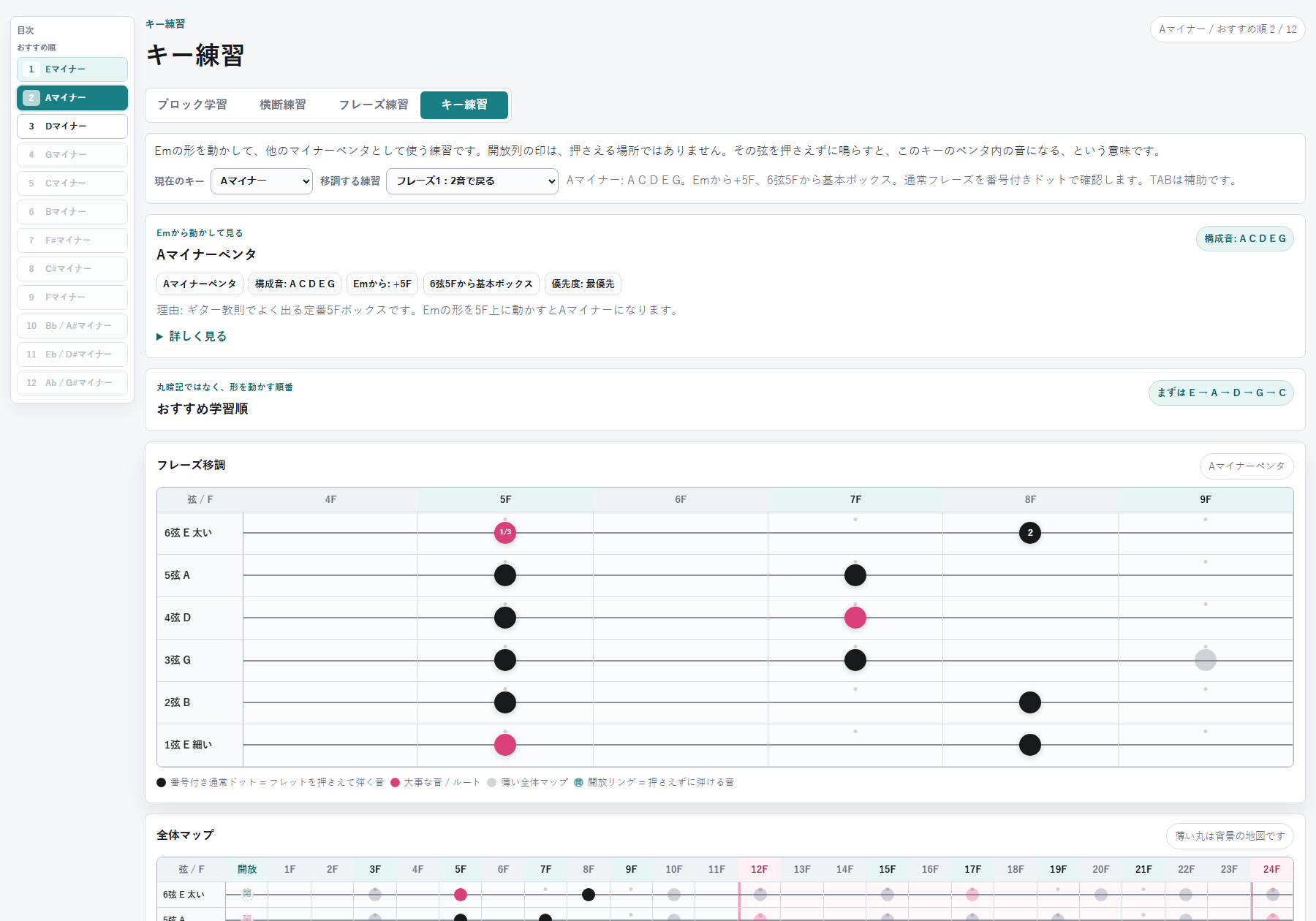
キー練習では、全12キーのマイナーペンタを選び、Emと何が同じで、何が変わるのかを確認できます。
形や弾く順番は同じですが、中心となるルート音と構成音が変わります。Aマイナーペンタの場合、構成音はA、C、D、E、Gです。
ここで重要なのは、12キーの形を、それぞれ別のものとして丸暗記することではありません。Emで覚えた形を、別のルート位置へ移動したものとして理解します。
アプリにはおすすめの学習順も用意し、まずはE、A、D、G、Cの順に形を動かして確認できるようにしました。学習順の説明は必要なときだけ開き、通常の練習画面では折り畳めます。
理論は必要なときに開いて読む
音楽理論にも興味がある一方で、練習画面に長い説明が常に表示されると、指板を見る妨げになります。
そこで、詳しい理論説明は折り畳み式にしました。
各画面では、必要に応じて次のような内容を確認できます。
- Eマイナーペンタの構成音
- ルート音の役割
- 度数による「1、♭3、4、5、♭7」という見方
- 開放弦と12Fの関係
- ブロック同士がつながっている理由
- 同じ形を移動するとキーが変わる仕組み
最初は理論の意味が分からなくても、実際に指板上の形を弾いた後で読むことで、音と説明を結び付けやすくなるようにしました。
AIで開発した個人用の学習ツール
このプロジェクトでは、ChatGPTを使って学習順序、必要な機能、説明文、音楽理論上の整理を検討し、CodexでWebアプリを実装しました。
開発当初は、ひとつのペンタトニックの形を表示するだけの簡単なアプリを想定していました。しかし、以前に独学で挫折した原因を振り返ると、形を覚えた後の使い方や、指板全体との関係が分からなかったことが大きな問題でした。
そこで、開放弦から12Fまでのブロック学習、ブロックをつなぐ横断練習、短いフレーズ練習、他のキーへの移調練習という順番に再構成しました。
指板上の音は、標準チューニング、ルート音、マイナーペンタの構成音から計算して表示しています。Em専用の位置を手作業で並べるのではなく、ルートを変更すれば他のマイナーペンタにも展開できる構造にしました。
AIを使うことで、既存教材の順番に自分を合わせるのではなく、自分が理解しにくかった部分を分解し、必要な表示や説明を追加しながら学習ツールを作ることができました。
今後できそうなこと
現在は、マイナーペンタの指板上の位置、ブロック間の移動、短いフレーズ、他のキーへの応用を学べるようにしています。
今後は、必要に応じて次のような拡張が考えられます。
- メジャーペンタとの関係
- ブルーススケール
- 自分で見つけたフレーズの追加
- フレーズの分類やお気に入り管理
- コードとスケールの関係
- 実際の曲で使われるフレーズの分析
ただし、機能が増えすぎると、何を練習すればよいのかが再び分かりにくくなります。
まずは、「形を見る」「番号順に弾く」「ブロックをつなぐ」「短いフレーズを覚える」「同じ形を別のキーへ動かす」という基本を優先します。
まとめ
このペンタトニックスケール練習アプリは、音楽理論を最初から完全に理解するためのものではなく、指板図を見ながら、音の位置と弾く順番を少しずつ覚えるための個人用Webツールです。
Eマイナーペンタを基準に、開放弦から12Fまでの地図、ブロック同士のつながり、短いフレーズ、他のキーへの移動を視覚的に確認できるようにしました。
ペンタトニックスケールを個別の点や形として丸暗記するのではなく、指板上でつながった地図として見て、実際に弾きながら理解していくことを目指しています。
AIを活用することで、以前は独学で挫折した内容を、自分が理解しやすい順番と表示方法を持つ学習アプリとして作り直すことができました。
現在は個人用として開発しています。使ってみたいと思った方や、こうした機能があると便利だと思った方は、コメントで教えてください。皆さんの反応を見ながら、今後どのように発展させられるか考えていきたいと思います。(XのDMで連絡する)
ADVERTISEMENT
Useful Items for Travel & Long Stays
Business Trip Packing List
A practical checklist to review before an overseas business trip or international travel. It helps you check your passport, work essentials, gadgets, and in-flight items before departure.